Sunday, June 24, 2012

Every Door Direct Mail (EDDM) Review

Every Door Direct Mail

Every Door Direct Mail is  a direct mailing program that the USPS has been promoting to small and medium sized businesses who want to use direct mail to promote their businesses, but might not have had the budget to do so in previous years. I’m going to go through exactly what Every Door Direct Mail is, how it works, and what types of businesses should be using it.

What is Every Door Direct?


Every Door Direct is a direct mailing program offered by the USPS, which allows businesses to target homes and businesses in specific geographic areas. A business can target homes and businesses based on specific zipcodes, or a certain mile radius from a specific address. You choose the area that you want to target by using a simple tool on the Every Door Direct Mail website. You can check out the search tool and see how easy it is to use by clicking here. The postage is as low as 14.5 cents per piece, which allows small and medium sized businesses an incredibly affordable way to run a direct mail campaign.

Once you complete your search you can hone down your list by carrier route, whether or not you want your mail to go to homes and businesses, P.O. boxes, or just homes. At least 200 pieces of mail has to be sent out, and it cannot be more than 5,000 pieces per day (it is possible to send more than 5,000 pieces a day with EDDM, but we find that most local businesses don’t need to. If you do need to send more than 5,000 pieces a day, feel free to call for details). There are also specific size formats the mail has to adhere to. A mail piece must be at least 10 1/2 inches long OR 6 1/8 in height. It does not have to be both it only has to be one or the other. The EDDM website still has the old specification of 11 1/2 in length but I have spoken to our local Post Master personally and he confirmed that it can now be 10 1/2.

Typically, mail pieces for Every Door Direct are postcard advertisements or brochures. Pending on the type of business you are promoting usually determines the best type of mailing piece to create that will get the best responses. Feel free to call JBS Printing at 781-871-4705 for a free consultation as to what would be the best type of mail piece to design for your business.

When you have your mail piece designed and printed and your target routed picked out, it’s pretty much just a matter of printing out your paperwork, which the EDDM website does for you, bundling your mail pieces correctly, and bringing them to your local post office. You mail is then delivered to every address on the postal route(s) you selected. You can do all of the paperwork and mail preparation and bring them to the post office yourself, or you can have your print service provider do it for you if they are familiar with Every Door Direct Mailing. There is typically a fee for them to prepare the mail and deliver it, but it is much better, and will save you time by having someone familiar with EDDM do the work. Your time is much better served running your business than doing a job that you can pa someone else to do for you.

What is the difference between Every Door Direct Mail and Traditional Direct Mail?

There are a few differences between Every Door Direct and standard traditional direct mail. The first is the size of the mail piece that can be delivered as mentioned before. With Evey Door direct the mail piece has to meet certain criteria, where traditional direct mail allows you to send out smaller pieces such as a standard 4 x 6 postcard, a small tri-folded brochure, or a letter inserted into a standard sized business envelope. These sized pieces do not qualify for Every Door Direct Mail. However, in our experience you are better served sending a larger piece anyways, because it will get more attention when it is delivered to someone’s mailbox, and will not go unnoticed as a smaller mail piece would.

We also find that you are better off sending a postcard or larger sized brochure as oppose to a letter inserted into an envelope, because recipients tend to read a postcard or brochure instead of opening a letter they might deem as “junk mail”. Plus with the low pricing on postage you can now send out bigger, eye catching mail pieces for alot less than traditional direct mail, so it only makes sense to want to send out bigger pieces, which typically lead to better response rates.

The added expense of purchasing a mailing list is also no longer needed. Unless you need to have a specific targeted list, you don’t have to purchase a mailing list. This is where business owners can start to see the substantial savings by using Every Door Direct over standard direct mail. One of the big reasons why so many businesses shied away from direct mail was the cost of the mailing list, now you can skip that added expense.

Some businesses do need to target specific criteria, and pending on the business you might see better results if you need to have your list super targeted as opposed to using Every Door Direct. The disadvantage is that if you need to have a laser targeted list is that you might have to pay a bit more per piece for postage, but the advantage is, you will not be spending money mailing to prospects that will never have a use for your product or services. It is best to call your direct mail provider to see which is the best direction for your business to go in.

Along with not needing to purchase a mailing list, businesses also no longer need to have each piece  printed with and address on it for each address they are mailing to. Again this leads to big savings in cost by eliminating this extra step. Because you are targeting every address on a specific carrier route, the mail carrier simply drops off one of your mail pieced to every stop they make.

Should my business use Every Door Direct?

If you market to the general public then Every Door Direct will be perfect for your business. Industries such as restaurants, dentists, gyms and fitness studios, and hair salons, are a few of the types of businesses that will benefit from Every Door Direct because they appeal to a wide variety of people.

If your business markets to a very specific type of person, or if your are a B2B, you may be better off using traditional direct mail, because you will need a very targeted list to reach your ideal clients and customers. When you have a specific service and a specific type of client you will benefit more from sending out to a smaller targeted list instead of saturating a specific area.

There are ways to target using EDDM, and pending on how targeted you have to be, it may work for you or it may not. For instance, let’s say you own a pool cleaning and maintenance business. With Every Door Direct you can target streets in a zip code that have a large number of pools on it, and only mail to those homes. Another example would be if you own a tree removal company or landscaping company. You can target streets that have homes with large yards and a large number of trees on it. This way you are not spending money on mailing to apartment complexes that most likely won’t have a need for your service. It’s still not the super targeting you can do if you went out and purchased a list, but this method of ge0-targeting works great for the local business who wants to target specific areas in towns. The best way to find out which method of marketing is right for your business is to give us a call, and we can evaluate the best way for you to advertise.

How do I get started with Every door Direct Mail?

If advertising an getting new clients in your local area is something that you are interested in, then the first thing you want to do is contact a printing company that offers Every Door Direct Mailing Services. From there you should discuss what type of mail piece you want to send out, what areas you want to target, and what would be the best plan of attack (Do you want to mail out once a week, once a month, every day, etc.).

From there you need to decide on the design of the mail piece. Is it a one time sale, is it going to be an on going promotion, or a general advertisement? Pending on what type of advertisement it is will determine on the amount of mail pieces you need printed. If it is going to be an ongoing promotion or a general advertisement, then you are better off printing a large quantity which will allow you better per piece pricing because the information will not be changing.

If it is a one time promotion, a week long sales for instance, then you have to determine how many you will need for that campaign, and you will probably not want to print a large quantity because they will of no use once the promotion is over. Again, spending a few minutes talking to your print provider is the best approach to find out the best way to run your campaign and get the most bang for your buck.

Does Every Door Direct Mail Work?

At the end of the day, all that matters is if Every Door Direct Mailings will bring in new business and sales for your company. There are many factors that go into a successful direct mail campaign, and when done right, direct mail is one of the best ways to advertise, especially for local businesses. The key is to be consistent. If you are just going to mail once then you will be wasting your money. You need to mail on a regular basis, whether it be weekly, monthly, or quarterly. But with the cost of Every Door Direct being so low and flexible, you can now advertise on a regular basis without having to spend a fortune.

Timing is also a factor, you don’t want to advertise a deal on snow tires in the middle of summer, you would want to do a mailing in the fall or close to the winter months when people are thinking about getting snow tires for their car. But on the flip side of that, if you own a take out pizza restaurant and say, Wednesday is your slow day, then you might want to send out a weekly promotion of a buy one pizza get a free small cheese pizza on Wednesdays to bring in traffic on your slow day.

Direct mail is a very effective form of advertising when done right. Consulting a professional is the best plan to take to make sure you maximize your advertising dollars to their fullest.

If you would like to learn more about Every Door Direct and Direct Mailing call JBS Printing for a free, no obligation consultation. 781-871-4705

JBS Printing, LLC
1401 Hanover Street
Hanover, MA 02339
781-871-4705
www.jbsprinting.net

Related Posts :

Source: http://www.bostonprintingservices.net/every-door-direct-mail-eddm-review/

small business printing printing company online

Why “Occupy Green Street” Worked, and Why it Shouldn’t Have

10 days after the announcement of National No Print Day, Toshiba pulled the plug and victory celebrations broke out through The Printerverse.

Victory is a strong word. It implies a winner and a loser, but there is some grey area here too.

Ok, in the movie version yes Toshiba is the villain and Print & Paper the heroes. But seriously, it takes CAJONES and a great deal of humility to pull a campaign.  Regardless of how I felt about it, I live in the advertising world and that isn’t often done – especially when it’s out there already. So I do have respect for that move, and it’s also why I wont be kicking the dog now it’s down.  I will only say that I hope Toshiba gets their “eco-ness” together, and runs their next campaign by me first ;)

There is also some grey that their intended office waste campaign is now on hold. Im sorry, but walk into a company and go into the copier room. Someone might find Hoffa under one of those stacks. Just because you can hit print, doesn’t mean you always need to.

Mr. Tree points out in his post 9 Lessons From Toshiba’s No-Print Day Debacle – what he learned, which got me thinking about what I took away from the experience.

Social Media Matters. A small but dedicated group took to Toshiba’s No-Print Day social spaces. Armed with the FACTS, we set up camp. Utilizing the information supply chain, we had a constant feed of ammunition and the ability to recruit additional support directly from the front lines.

I have been accused of forming this militia, but I will just agree that I had unfiltered access to signal for help in my ginormous LinkedIn Group and with the reach of PrintMediaCentr into the Socialsphere. However, I don’t have any doubt that a massive army was starting to form exponentially, and luckily we were able to stand down before it came to that.

Marketing Matters. Part of the reason I personally jumped right to the social media front lines was the phrase “National No-Print Day.” National in reference to a marketing campaign, about a National day, only means one thing to someone who comes from Advertising – NATIONAL. National, like “Just Say No,” or “Got Milk?,” or “The Incredible Edible Egg” type of National. It was imperative to get some sort of dissent out there before the National Campaign hit and then really, what could I do. You cant compete with “Just Say No” on Twitter.

I even thought to myself how ironic – a National print campaign AGAINST printing. But it didn’t happen. I don’t have access to the marketing minds over at Toshiba, but usually you have planned these things so when you launch the digital part the ads/printed materials are already sent and will come out around the same time. No ads (that I saw), no TV, no Radio… ummm no NATIONAL. Was the National campaign pre-empted by us? Were they doing a soft launch?  It’s possible, but doubtful in my experience launching a National campaign.

I also don’t know how many No-Print Day pledges Toshiba actually received, but their Facebook “likes” were at 316 and not stacking up very fast when I created the No Thanks Toshiba Facebook Page. I knew we could overtake the space once we fully mobilized the militia. 300 “likes” is nothing as far as a National movement goes and remember, Im still digging foxholes at this point and waiting for the National campaign to come!

And again, it didn’t.

The Lesson: Lady GaGa can start a National movement by flicking her pinky. The rest of us are going to have to actually do a campaign.  An Announcement? A video? A Facebook Page? This was the marketing effort behind a NATIONAL No-Print Day?

It’s pretty hysterical actually. Now that it is said and done, Im almost as upset about the marketing strategy fail as the message.  On the other hand, Im so HAPPY it was a marketing fail since Toshiba has money and if executed properly, momentum would have been on their side. One last thing on the marketing, for everyone really… you cannot refer to a video as “viral” until it has gone viral. Until then, it’s just a video.

Our Marketing Matters Too. We are deep into the world of Print & Paper and surrounded by the facts and figures of why Print Grows Trees and Two Sides and such. But is this information really getting past us and our customers and clients? It’s like QR codes… I have to assume you assume as I assume that everyone assumes that everyone knows what they are because how can they not – they are everywhere. But we are wrong.

So are there people who still think we kill trees, don’t care, and are set upon destroying the earth for a buck? Well, I guess more like .50 these days. Are our industry National Campaigns National enough?  Perhaps it’s something to think about in a broader view now.

Absence Doesn’t Mean Silence. Many times during the week battle cries of “Where is the Paper Industry” rumbled from the social media militia and out into the Socialsphere. I do admit especially in the first few days I found it odd they weren’t particularly up in arms since to mostly everyone “No Print Day” was really “Don’t Use Paper Day” with a good edit. So I reached out for some intel and basically came back with this:

If everyday in everyway, everything you do is already scrutinized and attacked and misjudged by the entire world, Toshiba’s campaign is just Tuesday to the Paper People.

Now I will add this.

Whether or not they were Tweeting and posting and blogging and what-evering, without the Paper Industry funding the studies and forestation programs and educating us and getting the info out there for the PRINT world to use in “defense” of our own livelihoods, Toshiba would have had a much better chance of starting a movement with a video.

I’m not discounting all of the money and effort the Print industry kicks in, in any manner by the way, Im just answering the “Where was Paper” question. Paper was in every tweet with a fact and every post with a study cited. Had Toshiba gained momentum I also believe they would have come out in droves to the front lines. Paper always has Prints’ back.

On the flip side – while the Print Orgs were blogging loudly, they also weren’t in the foxholes. But our noise and occupation of Toshiba’s space gave Printing Industries of America more power when they spoke directly with Toshiba, because Toshiba was watching us! I doubt Toshiba would have taken my call.  And if this campaign had gained momentum, I also believe the Orgs would have utilized all their channels and called-upon all their members to take some sort of action. So I feel as if they were doing what they were supposed to be doing, until they needed to do something else.

Last Call. It’s been a long 10 days. Occupation Green Street was a success in the fact that FACTS won out over FICTION, and for at least 10 days all of us were on the same side.

POWER TO THE PAPER… POWER TO THE PRINT… AND YAY!!! POWER OF THE PEOPLE!

Related posts:

  1. Calling all Print-Archists: Take a REAL STAND Against Toshiba’s No-Print Day!
  2. Green Printing Bill Unveiled – And Sure To Be Controversial
  3. Bill Would Provide Tax Credit to Green-Conscious Print Buyers
  4. Four ways to green your mailing list
  5. Poll: Public is not convinced by green marketing

Source: http://printmediacentr.com/2012/06/why-occupy-green-street-worked-and-why-it-shouldnt-have/

boston prints commercial printing companies

Neenah Paper Unveils Cabinet, a Unique Cross-Platform Application, Bringing Innovative Interface Direct to Designers' Desktops

At the HOW Design Live conference, the biggest gathering of designers, freelancers and creative professionals in the country, Neenah Paper announced the introduction of Neenah Cabinet for Desktop, a first-of-its-kind cross-platform Adobe Air application created for PCs and Macs that provides users with the most effective way to find, specify, compare and test the perfect paper for their projects. Neenah Cabinet for Desktop can be downloaded at www.neenahpaper.com/cabinet.

Cabinet demystifies, simplifies and advances the process of sampling, choosing, proofing and specifying the right paper, or combination of papers, for print projects of all kinds, giving users the essentials that will significantly impact their creative workflows. It improves the creative workflow in five distinct areas: Designing (offering inspiration, favorites and ways to test and combine images); Finding (supplying continuously updated waterfalls and chips); Proofing (allowing users to upload or select an image and receive a Cabinet Personal Proof on physical paper in three business days); Specification (step-by-step project management and spec tools to help build and archive accurate quotes); and Sourcing (efficiently locating printers, finishers and paper sources, including specialty engraving and letterpress shops). Cabinet is the new cross-platform that will be an essential complement to studios’ project management software or tools.

“Neenah Cabinet was born from the idea of creating an eSwatchbook to meet our customers’ needs as they become increasingly more mobile and tech-savvy,” said Thomas Wright, senior director of advertising and design for Neenah Paper. “As we started to wireframe it, we focused on making a tool that redefines how users access current and accurate paper information in real time. Cabinet quickly evolved into an intuitive tool to find and use papers beyond any website. And, for those who like the touch and feel of a swatchbook, Cabinet simply enhances the paper specification experience by helping users identify which paper fits their criteria. It provides another way to showcase papers that aren’t in their swatchbook or that are currently available in new, heavier weights for example.” 

All of Neenah’s well-known papers are included in Cabinet, including the CLASSIC brands, ENVIRONMENT, ESSE, EAMES, SUNDANCE Papers, and dozens more. The application also allows non-Neenah brands to be specified as part of a job. Cabinet helps designers, creative professionals and printers of every experience level and style, from novices to pros. With its seamless functionality, the drag-and-drop interface allows users to identify and sample papers, organize projects, utilize calculating tools, download handy templates, and much more. In addition, it directly integrates Neenah’s updated Personal Proof printed sampling service, the only program of its kind offered by a paper company, which allows users to create an actual proof using their work on any Neenah paper.

“With Personal Proof, designers can explore multiple creative options, experiment with new paper colors and finishes, and then see how the project looks on their specified paper when it arrives through priority mail on their front doorstep,” Wright added. “Integrating this program with Neenah Cabinet was essential to providing an all-encompassing application that goes above and beyond in an attempt to make the designer’s job easier.”

This content continues onto the next page...

Source: http://www.myprintresource.com/press_release/10733158/neenah-paper-unveils-cabinet-a-unique-cross-platform-application-bringing-innovative-interface-direct-to-designers-desktops/press_release/10733158/neenah-paper-unveils-cabinet-a-unique-cross-platform-application-bringing-innovative-interface-direct-to-designers-desktops

high quality printing printing and binding

Top 10 Business Books for Summer Reading

The page you're looking for was probably moved or removed. Here are a few links to help you find what you're after.

Source: http://www.openforum.com/articles/top-10-business-books-for-summer-reading

marketing and printing boston prints

Saturday, June 23, 2012

Does RedBox have a great CRM program or what?


A while back, I wondered why nobody CRMs me anymore. Nary a “thank you,” a “we want you back,” or a “we have a special offer for you, our best customer.” And I can be a great customer!

Then Rachel in our office told me she hears all the time from a company called RedBox.

I’d never heard of it so Rachel had to tell me that RedBox rents out movies from fancy vending machines for $1.20 a night. They’re in 29,000 locations with a presence in every state.

It’s all computerized. You search for a movie you want and swipe your credit card. If this is your first time you use the onscreen keyboard to enter your email address. Then out pops your DVD in a plastic case. You bring it back the next day. 

The CRM part starts before you get home with a receipt/confirmation sent to your Inbox.

When you return the movie, you get 1) a thank you with a receipt and confirmation; 2) a weekly email, mostly about new releases; 3) a contest to win free movies for a year. RedBox even has a blog with giveaways, lists of top movies and reviews.

Twitter? About 47,000 followers. Facebook? About 4 million likes.

Rachel says “The website and mobile app are great! I can see if the movies I want are at my nearest Redbox so I can save time. I can even reserve the movie online and go pick it up.

The Los Angeles Times wrote: “…Redbox’s parent company, Coinstar Inc., reported that revenue for the $1.20-per-night DVD rental business surged 40% during the final three months of 2011 to $445.6 million and 35% for the year to $1.56 billion.That’s a lot of $1.20 credit card swipes.

RedBox’s ongoing contact program, its CRM, offers peace of mind (the confirmations and receipts), useful information and a chance to win something … all the time and oh so effortlessly. Along with the quick service and low price, it’s a great combination. Why do so few companies do things like this?

Source: http://www.joyofdirectmarketing.com/does-redbox-have-a-great-crm-program-or-what/strategy

stationery printing boston graphic designer

Learn from other AdWords advertisers in the AdWords Community!

Since its launch in mid-February 2012, the (still-new) AdWords Community, has been a place for for all kinds of AdWords users (from small businesses to bigger advertisers) from all over the world to come together and exchange ideas, advice and stories with other AdWords users. It's really inspiring to see people sharing their best practises, pointing each other to resources, and enthusiastically helping those who need it.


I’d like to share with you a few comments from our members on their experiences with the AdWords Community:

NehaGupta: “I am happy to be part of Google AdWords Community. I love to discuss about Google AdWords as much as I can as I believe discussions always bring something knowledgeable. Perfect platform for me. I am really excited spending more and more time here instead of Facebook. Everyday I’m learning new things and also trying to take part in conversation by replying answers asked in the forum.”

PPCBossman: “Hundreds of advertisers flow in and out of this Community on a daily/weekly basis and we all roll on as if it's just another day. ...There are great days where lots of problems get worked out, new advertisers are learning and members are achieving personal goals here within the Community. Just as any real life situations, we also have some down times too. ...I have had the most amazing experience here in the last few months, made some great friends, learned a ton and helped a few people along the way as well. But I keep coming back because I know that this Community, Visitors and Members alike, are here for me and guess what, they're here for YOU too! (for the full post click here)

David-nationalp: “I'm here because I'd like the ability to have some input into the direction that Google AdWords goes, understand what's going on in the PPC world, and be able to learn/share knowledge of Google AdWords.”

But the AdWords Community is more than just user discussions; you can find insightful articles (so called “AdWords Wikis”) written by expert users. You can learn more about the some of the community members, such as the Top Contributors, and what it takes to become one. And you can get some reassurance that the Google AdWords Community team is not just a bunch of robots. But instead of taking our word for it, why don't you go and find out for yourself! If you'd like, go ahead and leave us a comment by clicking on the "new message" button directly on the forum.

We are looking forward to see you in the Community!

Note: Currently, the AdWords Community is also available in the following languages: French, German, Spanish, Portuguese, Russian and Italian.

Posted by Zuzana S. Moran, AdWords Community Team

Source: http://feedproxy.google.com/~r/gybblog/~3/tHg3leExHak/learn-from-other-adwords-advertisers-in.html

high quality printing printing and binding

Free Wi-fi, Friend or Foe? [infographic]

via Free Wi-fi, Friend or Foe? [infographic].

As mobile devices become more and more popular the demand for easy access to wi-fi increases as well. It is already pretty easy to access wi-fi in most places including coffee shops, restaurants, the mechanics, etc. Access to wifi will only become wider spread and easier to access especially when it is predicted 1 in 4 users will have more than one connected device by 2016. Not only is the user base for connected devices growing but traffic is as well, growing 133% in 2011 and predicted to grow another 110% by the end of this year.

While free wi-fi is great it does not necessarily protect you the same way a secure network may. Today’s infographic Free Wi-fi, Friend or Foe? gives us some examples of ways hackers can hijack your accounts and how to ensure your safety when browsing on an open network. One easy way to ensure your security when loggin on to a free public network is to know the exact name of the network. You don’t want to log onto a network someone nearby the coffee shop created giving them total access to personal files. A lot of computers have shared folders that can be accessed by other users on wifi, these sharing features are something that can be turned off to increase security.

Related posts:

  1. 10 Superb Ways For A Small Business To Friend Facebook
  2. Agfa Graphics launches new :Azura V chemistry-free plates at IPEX
  3. ACLU says Net Neutrality protects free speech!
  4. Free Download: Graphic Display Professional Magazine
  5. PMC Launches FREE Global Print & Integrated Marketing Services Directory!

Source: http://printmediacentr.com/2012/06/free-wi-fi-friend-or-foe-infographic/

print graphic designer printers local

Calling all Print-Archists: Take a REAL STAND Against Toshiba’s No-Print Day!

Toshiba’s self declared “National No-Print Day” is a marketing scam. It’s an environmental bait and switch to get people behind a cause they are championing with non-facts and viral videos, when in fact they are just roping you in to be noticed. I am not going to link to any of their propaganda, so please do your own research if you are unaware of what Im writing about.

I am also not going to preach to the choir. If you are involved in Print, Paper or Marketing you know that being environmentally responsible is a mission, not a gimmick for “pledges” on a Facebook page and attention.  But I suppose a “No-Print Day” is a better “cause” for Toshiba to market than bringing to light the environmental impact of creating and disposing consumer electronics, toner ink, and of course computer batteries plus everything else they make – including PRINTERS!

And speaking of that, there are some that say – oh, how BRAVE of a company that makes printers to take a stand on the tree killing print and paper industry  – and to those people I would say how about some ice for that kool-aid? 

The FACT is we agree that everyone, every chance they have, should be environmentally responsible. If only Toshiba didn’t make a stand against Paper & Print, and marketed a “National Eco Awareness Day” or something along those lines, not calling us out with misinformation. If they shared the FACTS on the sustainability of Paper & Print along with asking people to look around and see how they can do better in their offices and homes, I know I would have supported that and I might have even taken the pledge!

But that is Armchair Quarterback Marketing. What’s done is done, so now, what can we do?

I created this Facebook Page – No Thanks Toshiba. My goal is to get more likes against No Print Day, then they get pledges, so PLEASE just click and like it now. This is more of a “ha ha” thing, but it feels good and will feel even BETTER when we outnumber them!

I also created a list of ACTION options. Certainly there are more and I’d love to hear what you come up with… leave it on Facebook along with your messages to Toshiba!

TURN IN/TOSS YOUR TOSHIBA!  If you have a printer in your home or office and the lease is up, get rid of it and let them know why. If you can get out of your contracts earlier, do it.  If you use their laptops, next time don’t and same with whatever else they make. The bottom line in marketing is always the BOTTOM line – and if they don’t care about ours, why should we support them?

WRITE LETTERS! Yes, type a letter, print it OUT on PAPER, and send it to:

Mark E. Mathews
President & Chief Executive Officer
Toshiba America Business Solutions, Inc.
2 Musick  Irvine, CA 92618-1631

MAKE THEM PRINT & SUPPORT US! Organize all your friends, family and contacts to call for brochures/printed materials: http://business.toshiba.com/dealerLocator/search.jsp

RUN UP THEIR PHONE BILL! 1 800 GO TOSHIBA – Let them know how you feel

ENGAGE WITH YOUR CUSTOMERS! Set up a page on your website, Facebook page, or use Twitter so your customers can take the NO Thanks to NO-Print Day Pledge (or send them to the one I made). Offer an incentive (discount on next job within a time period, free biz cards with order etc).  Toshiba want’s NO Print, let’s create MORE PRINT – best revenge!

TAKE TO THE SOCIALSPHERE! I declare Toshiba #NoPrintDay Thursdays. Starting this week, send at least 1 tweet to @ToshibaUSA against this “cause” on Thursday and thereafter. Make sure to include #noprintday since they are watching it.

Post on your blogs, Facebook, LinkedIn, G+ and SHARE the FACTS on your environmental practices and the overall sustainability of Print & Paper.

Remember – This isn’t a war against TOSHIBA, it’s a factual and professional response to misinformation and greenwashing using the Print & Paper industry as the proverbial bad guys.

GUERRILLA ANYONE?  Take to the streets. Print out 8.5 x 11’s and hang them around town. “This printout helped plant a forest” and include a QR code to a mobile optimized page on your website with facts. Include your email for more info – maybe make some new contacts.

Don’t have time to go around town? Use your email signature with same message and link to your site with the FACTS, and you can also tie in the say “No Thanks Pledge” mentioned above.

Don’t have access to do that – put the message and link to an Industry site of your choosing where FACTS can be found.

WHO’S WATCHING THE WATCHERS? Is there a way for us to demand/require an independent body must be hired by Toshiba to confirm not ONE thing was printed by Toshiba, or any of their vendors FOR Toshiba, on No Print Day? The ramifications of them fighting such a thing would essentially show their true intentions. 

I do have a running dialogue in my head debating whether or not to bring ANY attention to Toshiba and this ridiculous cause. But if history shows us anything, you can’t leave it up to others to step up for you. I hope you are ready to stand up, be vocal, be counted, and be TWEETING on Thursdays!

Related posts:

  1. Print Delivers Seminar Hosted by Williamson Printing Draws a Crowd to Learn About Printing Medium
  2. WhatTheyThink’s 2nd Annual Print CEO Forum to Include Marketers’ Perspective on Print
  3. Sappi and The Print Council Explain How “Print Delivers” in NYC
  4. What Printers Might Not Know About Print Buyers (but should)…
  5. It’s time to pull Print Producers into your Marketing efforts!

Source: http://printmediacentr.com/2012/06/calling-all-print-archists-take-a-real-stand-against-toshibas-no-print-day/

logo printing local printing

Friday, June 22, 2012

Global Card Market Reaches $17 Billion in 2011, Up Nearly 14% From 2010

The global card market reached $17 billion in 2011, jumping almost 14% from 2010, according to the 2011 International Card Manufacturers Association (ICMA) Global Card Market Statistics Report. Higher value chip-based cards used in mobile phones and other electronic transactions as well as expanded production in the Asia-Pacific region led market growth as more than 30 billion cards were manufactured worldwide in 2011, adds the report.

However, the report points out, the global card market will experience somewhat slower growth through 2015 and traditional magnetic cards will continue to be replaced by chip while smartphone apps and NFC technology will impact growth beyond 2015.

“The global plastic card market remains very strong in the mobile phone, financial, government/health and gift card market segments and we can expect continued growth in these segments for the next few years,” says Al Vrancart, ICMA Industry Advisor and Founder Emeritus.

Report Highlights

Other key highlights of the report include:

• Mobile phone cards continued to dominate the global market in 2011 (15.2% or 4,639,000 units) in volume and value, followed closely by financial transaction cards (15.2% or 4,628,000 units).

• The gap between the volume of traditional and chip-based cards manufactured was smallest in the Asia-Pacific region (51.7% and 48.3%) and Europe (54.2% and 45.8%).

• Asia-Pacific leads the regions as the largest producer of cards, with more than 10 billion cards manufactured in 2011. North America was second with 8.3 billion units manufactured. Europe is in the third position with 4.9 billion units manufactured and Middle East Africa in fourth with 4.2 billion cards. Latin America stayed close to last year’s figures at 1.9 billion units manufactured.

ICMA is a global non-profit association for card manufacturers, personalizers, issuers and suppliers, and publishes its Global Market Statistics Report annually. The comprehensive report provides readers with valuable industry data garnered from primary and secondary research and statistical modeling. The report examines 15 market segments—ranging from telephone scratch-off to access control—as well as card production in all global regions.

The report is available to ICMA members on the ICMA website at www.icma.com. Non-members can purchase the report for $1500 and obtain information on becoming a member of ICMA by contacting Lynn McCullough at 609-799-4900 or lmccullough@icma.com.

Source: http://www.myprintresource.com/press_release/10733148/global-card-market-reaches-17-billion-in-2011-up-nearly-14-from-2010/press_release/10733148/global-card-market-reaches-17-billion-in-2011-up-nearly-14-from-2010

digital printing services newsletter printing

Miller Boom Box

Milldiel619
The idea was to  attract attention to and to make Miller the preferred brand among other six packs in the summer when beer consumption spikes.

Miller is closely linked with music in Turkey. It has been organizing Miller Music Factory,a contest to discover fresh music talents for six years and Miller Freshtival, a music festival, for two years now.

This is why we have chosen music as a theme for our six packs. We havedesigned two sided boxes, one side looks like a speaker and the other is the casette player.This way when three boxes are brought together side by side, they form a boombox.

Designed by Manajans/JWT Istanbul

BOOMBOX 1

BOOMBOX 2BOOMBOX 3BOOMBOX 4

Source: http://feedproxy.google.com/~r/TheDieline/~3/b9BNZ0Ap3DM/story01.htm

menu printing high quality printing

Using Blogger for your Organization's Website

Editor’s note: this is a guest post from David Kutcher, co-owner of Confluent Forms LLC and Business Blogger whiz.

Our company is based in the college town of Northampton, Massachusetts, a town with a very strong culture of “buy local” and “buy small” ingrained in the social fabric. Walking down Main Street you can count on one hand the number of chain stores found here; small businesses dominate. But in this tight economy, how does a small business that can’t or won’t deep discount compete against the large online retailers? How can they keep their existing customers motivated without slashing their prices, let alone grow? And how can my firm deliver a compelling website solution that helps these businesses succeed within their small business budget?

Blogger is a hidden gem in the area of website development, providing advanced services for customers at a greatly reduced cost. Behind every Blogger blog is built-in Content Management System (CMS) functionality which provides for most customer needs where a unique CMS is unnecessary. With the added benefits of Google-backed hosting, built-in security and an easy to use editor, it further lowers the learning curve for any customer's management of their site while being feature rich, intuitive, and customizable. As these services are provided by Blogger without cost, there is already a significant return on investment before any custom templating or other advanced development services are required.

Blogger can easily be used to create the “standard” 5 page corporate website, but a Blogger solution can also be used to great effect to engage a company's customers and fans. Using the native blogging functionality, it can alert your customers to new products, services and events, establish you as an expert through informative articles, showcase your achievements, and even make your business more approachable by highlighting your friendly and knowledgeable employees.

Over the past few years we’ve created a number of compelling websites, built on the Blogger platform, that have enabled our small business clients to interact with and grow their customer base. Our mantra for our clients has been to

  1. establish the business as an expert,
  2. keep the business in front of their customers/clients, and
  3. make the site as easy as possible for the business to maintain.

A Blogger-based solution empowers these small businesses while still being customizable, affordable, easy to maintain, secure and stable.

Some examples of client sites that we’ve created and the content strategies behind them (and yes, these are all built on Blogger!):

Concentrics Restaurants, Atlanta GA
A restaurant group and consulting company that uses their site and blog functionality to showcase their restaurants, discuss their service offerings, announce new press and events, and alert their fans to specials. Their restaurants are unique experiences; the website was designed to capture the beauty of the spaces and the food and tempt new customers to experience it for themselves.

Pinch Gallery, Northampton MA
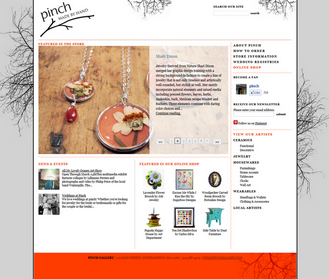
An artisan gallery that uses blog posts to showcase new artists and products in their store, providing additional context to the products in their online shop and giving existing customers a reason to stop by and check out what’s currently in the gallery. The Blogger site brought in such great traffic from far outside the normal customer area that Pinch decided to open up a web store that has been a huge success.

Ode Boutique, Northampton MA
A boutique clothing store that also doubles as a fashion blog discussing trends and featuring new clothing and accessories in their store, along with spotlights on local inspirational women, charities that they support, and their monthly Arts Night Out events. The site follows their mission of “marrying fashion, philanthropy, art and community in order to create an inspiring place to be and to shop”; each photograph, story, inspiration board, article or event that gets posted on their site advances their mission and their business.

Bakery Normand, Northampton MA
A true mom-and-pop bakery that writes about new seasonal offerings, communicates their ordering schedule for holiday products, and throws in some philosophical pieces that you know the baker was mulling over as he waited for the bread to rise. The Bakery waited until 2011 to have a website (after being in business 30 years!) and since the site has launched has jumped right in and begun using it to the fullest. It even encouraged the baker to experiment with new products because he wanted to post new pictures and product stories on his website!

How this translates into an engaging website for your business...

Step 1: writing articles, posting photographs, and creating content engages your customers and potential customers; a Blogger site provides the perfect platform as it was built for blogging.

Step 2: creating easy ways for your fans to follow you to get notified of new content (new products, service updates, specials, events, etc.) through "follow by email", RSS feeds, fan pages (Google+, Facebook, Twitter, etc.); Blogger provides these social media sharing functionalities out of the box.

Step 3: getting found through search engines and local searches; being a Google product has its benefits and Blogger has added additional tools for optimizing your site for search engines.

If you’re curious about using Blogger for your business you can view this Hangout on Air about Blogging for Your Business or read additional articles that we’ve written on the subject.

Posted by David Kutcher, Web Developer

Source: http://feedproxy.google.com/~r/gybblog/~3/mmufISi6Fko/using-blogger-for-your-organizations.html

printing quote quick printer

Design a Visually Compelling Website

By T.J. Tedesco | Posted on June 15, 2012

Last week, FEI marketing guru Marka went over how to create an accessible, user-friendly website. This week, the tribe discusses how to design an attractive website that drives business. Remember, fire = print.

The FEI tribe had gathered in the conference room for another O-site design meeting. Marka stood in front of the whiteboard.

“Zoot, what would happen if you went on a sales call wearing the ratty, stained, 10-year-old toga you usually reserve for weekends watching O-golf on TV?” she asked

“At the very least, I wouldn’t get the business,” Zoot said. “Most likely, I wouldn’t even make it past the lobby.”

“Right,” Marka agreed. “But why should your outfit matter? Aren’t you the same salesperson regardless of what you wear?”

“Of course,” Zoot said, “but the fact is, we all judge people in part based on their appearance.”

“This is true of O-sites, too,” Marka pointed out. “Visually appealing O-sites create positive brand impressions for our customers, which leads to more sales. Whiteboard time.”

Marka scribbled her first tip on the whiteboard:

O-site design tip #1 - Strike the right balance between text and graphics.

“Graphics and videos grab user attention,” Marka began. “Text gives users the information they need. Effective O-pages will contain both categories of elements.

“There’s no golden rule for how much text we should include on an O-page. We should use as many words as it takes to describe why our product or service is important to the reader. The images should be  large and prominent, but not distractingly so. Text-heavy pages intimidate readers, so even using an O-Clipart image is arguably better than nothing.”

“Moving on!” Marka said as she began writing again.

O-site design tip #2 - Use text as a design element.

“Fonts. Formatting. Colors. Text design elements such as these can determine whether someone reads our O-site or loses patience and closes the browser,” Marka declared. “Here are some tips for using text to create more readable, eye-catching O-pages.”

Marka scribbled like mad on the whiteboard:

Fonts – Use a readable font and font size. Sans serifs are usually recommended for text and headers. Screen resolution is not as high as print resolution. As a result, simpler sans-serif fonts are usually easier to read on O-puter monitors, while serifs may blur together. Use legible fonts and the same font families throughout your O-site.

Layout and formatting – Long paragraphs bore readers. Deliver your O-page’s information in a concise, easy-to-skim format. A good rule-of-thumb is to make sentences five lines at most—not five sentences. Break up long paragraphs with bolded or italicized headers, photos or bullet points. Include graphs or charts when appropriate.

Text design – Make words bold, color and italics in moderation. Also avoid underlining text because readers will think it’s a link.

“With all this emphasis on text, let’s not forget to...” Marka scribbled some more:

O-site Design Tip #3 - Focus on what’s important.

“At the risk of stating the obvious, the ultimate goal of our O-site is to drive business,” Marka said. “We can’t let pretty pictures distract from this focus. Every page of our O-site should feature design elements that help sell our fire products and services. These include:

  • Logos and other branding elements,
  • Big, distinct call-to-action buttons or links,
  • Product photos,
  • Images and photos that connote FEI’s key brand attributes, and
  • Video testimonials.

“Persuasive presentation, Marka,” Zoot said. “Now if you’ll excuse me, I have a ratty old toga to toss out.”

FIRE! Point
Pay close attention to how your website looks. Strike the right balance between text and graphics, and use text as a design element to create a visually appealing site that readers will love. But don’t forget that the point of your website is to drive new business, and most of your design elements should be focused on getting users to click “buy.”

FIRE! in Action: Erchonia Improves Design, Increases Site Traffic
The company, which specializes in laser health care applications, redesigned its site and also optimized it for search engines. The result was an eventual 300 percent overall increase in site traffic.

Next week: Tips on creating excellent content for your website.

Source: http://feedproxy.google.com/~r/printingsbestblogs/sales-marketing/~3/TN_FDKUU9x0/design-visually-compelling-website-your-printing-company-tj-tedesco

marketing and printing boston prints

Thursday, June 21, 2012

Design a Visually Compelling Website

By T.J. Tedesco | Posted on June 15, 2012

Last week, FEI marketing guru Marka went over how to create an accessible, user-friendly website. This week, the tribe discusses how to design an attractive website that drives business. Remember, fire = print.

The FEI tribe had gathered in the conference room for another O-site design meeting. Marka stood in front of the whiteboard.

“Zoot, what would happen if you went on a sales call wearing the ratty, stained, 10-year-old toga you usually reserve for weekends watching O-golf on TV?” she asked

“At the very least, I wouldn’t get the business,” Zoot said. “Most likely, I wouldn’t even make it past the lobby.”

“Right,” Marka agreed. “But why should your outfit matter? Aren’t you the same salesperson regardless of what you wear?”

“Of course,” Zoot said, “but the fact is, we all judge people in part based on their appearance.”

“This is true of O-sites, too,” Marka pointed out. “Visually appealing O-sites create positive brand impressions for our customers, which leads to more sales. Whiteboard time.”

Marka scribbled her first tip on the whiteboard:

O-site design tip #1 - Strike the right balance between text and graphics.

“Graphics and videos grab user attention,” Marka began. “Text gives users the information they need. Effective O-pages will contain both categories of elements.

“There’s no golden rule for how much text we should include on an O-page. We should use as many words as it takes to describe why our product or service is important to the reader. The images should be  large and prominent, but not distractingly so. Text-heavy pages intimidate readers, so even using an O-Clipart image is arguably better than nothing.”

“Moving on!” Marka said as she began writing again.

O-site design tip #2 - Use text as a design element.

“Fonts. Formatting. Colors. Text design elements such as these can determine whether someone reads our O-site or loses patience and closes the browser,” Marka declared. “Here are some tips for using text to create more readable, eye-catching O-pages.”

Marka scribbled like mad on the whiteboard:

Fonts – Use a readable font and font size. Sans serifs are usually recommended for text and headers. Screen resolution is not as high as print resolution. As a result, simpler sans-serif fonts are usually easier to read on O-puter monitors, while serifs may blur together. Use legible fonts and the same font families throughout your O-site.

Layout and formatting – Long paragraphs bore readers. Deliver your O-page’s information in a concise, easy-to-skim format. A good rule-of-thumb is to make sentences five lines at most—not five sentences. Break up long paragraphs with bolded or italicized headers, photos or bullet points. Include graphs or charts when appropriate.

Text design – Make words bold, color and italics in moderation. Also avoid underlining text because readers will think it’s a link.

“With all this emphasis on text, let’s not forget to...” Marka scribbled some more:

O-site Design Tip #3 - Focus on what’s important.

“At the risk of stating the obvious, the ultimate goal of our O-site is to drive business,” Marka said. “We can’t let pretty pictures distract from this focus. Every page of our O-site should feature design elements that help sell our fire products and services. These include:

  • Logos and other branding elements,
  • Big, distinct call-to-action buttons or links,
  • Product photos,
  • Images and photos that connote FEI’s key brand attributes, and
  • Video testimonials.

“Persuasive presentation, Marka,” Zoot said. “Now if you’ll excuse me, I have a ratty old toga to toss out.”

FIRE! Point
Pay close attention to how your website looks. Strike the right balance between text and graphics, and use text as a design element to create a visually appealing site that readers will love. But don’t forget that the point of your website is to drive new business, and most of your design elements should be focused on getting users to click “buy.”

FIRE! in Action: Erchonia Improves Design, Increases Site Traffic
The company, which specializes in laser health care applications, redesigned its site and also optimized it for search engines. The result was an eventual 300 percent overall increase in site traffic.

Next week: Tips on creating excellent content for your website.

Source: http://feedproxy.google.com/~r/printingsbestblogs/sales-marketing/~3/TN_FDKUU9x0/design-visually-compelling-website-your-printing-company-tj-tedesco

online business printing business printing online

Dearly Beloved

Dearbeldiel619

This is a Californian red wine aimed at a younger wine-drinking crowd.

We had a name but needed to get away from any marriage connotations. The brief was: do what you like. So we did. Total production was 30,000 cases and it sold out in six weeks. Range extensions are in development now.

Designed by Stranger & Stranger 

Dearly Beloved 1 Dieline

Dearly Beloved 2 Dieline

Source: http://feedproxy.google.com/~r/TheDieline/~3/W6WZjNCoMmA/story01.htm

local printing print marketing

5 Questions Every Business Owner Should Answer Before They Try To Grow Their Business

Actually, starting a business is pretty easy these days.

Figuring out how to sell something, something you know how to deliver or something in demand, isn’t that hard or expensive anymore – if, your goal is to simply bang out a living and get by.

kenteegardin via Flickr

If, however, your goals are a bit more ambitious, say to grow an asset that you might sell, become wealthy or dominate an entire industry, then you better be prepared to do things a little differently than most.

Below are five questions that, when answered intentionally and addressed constantly, will keep you rooted in the place where real growth and world domination occurs – in the realm of the customer.

1) How can we make our value proposition as simple as possible to communicate?

Of course, this assumes that you have a truly unique point of differentiation, one that allows you stand out over and above anyone that dares call themselves your competition.

But, possessing this core value proposition isn’t enough. You must also find a way to communicate it in a simple and consistent manner. A phrase, one word perhaps, a metaphor – lacking these, you’ll find it hard to garner the kind of momentum that real growth and strong branding requires.

I’ll boldly suggest that the name Duct Tape Marketing carries the kind of simple message of difference that you’re looking for. A great deal of the success of my venture is due to the pure luck of associating that metaphor with my systematic approach to small business marketing.

2) What additional streams of revenue can we develop from our core offerings?

Many companies fall into this one quite by accident, but real growth comes from seeing what you do well and proactively building additional streams of income, residual or otherwise, into your business model.

Over time this is a very powerful way to build an asset. When you can point to revenue coming from many converging streams you build a buffer against a sudden market or competitive change.

Look at every product or service you offer and start ask yourself what the next natural sale could be. For example, if you offer an online training program, could you offer a live workshop and then an ongoing maintenance program? If you’ve discovered how to do something well, could you teach others in your industry how to do it well and generate addition revenue while elevating your status in your industry?

3) What does our total customer experience look and feel like?

It seems like most businesses focus attention on all of the elements that get the phone to ring, but spend very little time diagramming exactly what happens during the sales process, the product or service delivery process or anything that might happen down the road that would stimulate repeat sales and referral introductions.

By mapping out the entire process of marketing touchpoints, all the places where your company does or should come into contact with customers and prospects, you can design a total brand positive experience – the kind that gets people talking about how you’re different.

Stop and ask how you could be easier to do business with. How you could do something that not only wows, but also inspires. What could you do that would make your customers smile? How could you surprise them?

4) What resource gaps do we need to fill right away?

In order to build an asset you’ve got to stop doing things that don’t make you money, that rob you of time needed to practice your high payoff activities, and that you simply don’t do well. You’ve probably still got to get many of those things done, but by others.

Map out how you will hire, outsource and retain the resources needed to fill your current gaps.

Do you need someone to take over your bookkeeping? Do you need a graphic designer on staff? Do you need a VA? Should you hire a VP of Operations?

Have you stopped to figure out what your time is worth? Have you determined what a unit of labor produces for your business? There’s a wonderful book by Greg Crabtree called Seeing Beyond the Numbers that teaches a tremendous lesson on how to calculate labor as a lever rather than a cost.

5) What mutually beneficial partnerships could we develop right away?

To me, this is perhaps the most potent and most underutilized mindset of all. To a large degree I’ve built my brand by creating content that others want to share and perhaps 50% of my revenue is derived directly through these relationships.

Strategic partnerships have a tendency to multiply quickly. If you can associate your brand with the right three or four partners, you can develop a kind of momentum that attracts many more.

This is an element that should not be seen as a nice bonus left up to chance. This is an element that must be an essential part of your quarterly planning process. Maintain a short list of attractive strategic partners at all time and go to work on building a plan to recruit, introduce and amplify a mutually beneficial program of relationship and community building with these partners.

Source: http://feedproxy.google.com/~r/ducttapemarketing/nRUD/~3/mpV6d5JVG4U/

printing and copying logo printing

How To Write Emails that Sell (and that People Love to Read)

image of reading chair

The vast majority of email marketers make one of two mistakes:

  1. They give away too much content without doing enough selling
  2. They do too much selling without giving away enough content

And it’s costing them a lot of money.

But there’s also a third way that hardly anyone uses.

A way that satisfies your audience’s desire for content while also persuading them to buy. In a way that is fun for you to write, and for your subscribers to read. In fact, even if you are blatantly selling, people often don’t care and actually welcome your pitches.

Believe it or not, I blatantly pitch almost every week day using this method. In some cases, I pitch my product on the weekends, too.

Since I started using this method almost 4 years ago, my sales have never been higher.

And even though I’m always pitching and selling my products, I get few (if any) spam complaints. Hate mail about my daily email frequency is non-existent. And it’s a cold day in Hades when I teach anything found in my paid products.

Customers have never been happier, and my list has never been more satisfied.

So what’s this big email secret? And, how can you use it?

It’s called “infotainment.”

This is just as it sounds — merging information with entertainment. The best infotainment description is from Alan Alda (who played “Hawkeye” in the hit TV show “M.A.S.H”). He was being interviewed about his friend Don Hewitt — founder of the show “60 Minutes” — who had recently died, and he was asked why the show was so popular.

Alan Alda said (paraphrased):

What they do is give viewers a great-tasting hot dog but that nourishes them like broccoli.

This is exactly what infotainment does.

In other words, your content is presented in a way that’s fun to consume, but still delivers real value at the same time. This one approach has allowed me to dominate in virtually all the markets I’ve written emails for — even when using a weak sales letter to a small list. And while I now use dozens (well over 50) ways to use infotainment in my emails, the following 3 ways alone can get the job done no matter what kind of product or service you sell.

Work them in to your emails (starting today) and watch what happens:

Infotainment secret #1: inject your personality into every email

Just being yourself (warts and all) in emails can bring you more long-term response than any other email tip, tactic or “technique” combined.

Even if you have the highest prices and don’t have the best product, the fact you’re “for real” creates a bond of trust that makes people want to buy from you and only you.

So go ahead, crack a joke.

Have an opinion that’s not popular.

And let your unique personality shine through in every word.

Show customers the real you … and they’ll cheerfully open their wallets.

Infotainment secret #2: tell stories

Stories are a great way to sell in emails.

I don’t care what the product or service is. If you can work in a story, your chances of making the sale go up dramatically.

For one thing, stories are naturally entertaining.

Think back a few thousand years. Stories were the only real entertainment people had. They didn’t have TV or radio or the Internet, just stories — which are a great form of entertainment.

It’s very easy to process information from stories, too.

We’re “hard wired” to learn from and communicate through them.

And, in many cases, it’s the most persuasive way to get someone to do what you want. Whether it’s persuading someone to buy your product or persuading a child to be careful of talking to strangers — stories inspire and motivate people to take action.

Many times sales are made just from the story!

Just look at the hit 80′s movie “Top Gun”.

That movie “sold” thousands of young whippersnappers on joining the Navy, even though it never once pitches anyone on it. (The Navy even put recruiters in movie theaters where it was playing.)

As the old adage says:

The more you tell the more you sell. And this is especially true if you’re telling stories.

Infotainment secret #3: pop culture references

Finally, one of my favorite ways to be infotaining is “piggy backing” off of pop culture.

I’m a big fan of doing this not only from a personal point of view, but because as the late (great) copywriter Eugene Schwartz said: That’s your market. Those are the words, the feelings, and the hot buttons that motivate them.

What I like to do is work pop culture analogies, references, jokes and even quotes into my emails. If nothing else, it keeps your emails fun, loose and interesting (all of which combine to make emails more readable and “buyer-friendly”).

So always be asking … what’s popular?

What are the most-watched TV shows?

What movies are people raving about?

What magazines, radio shows, books or websites are hot with your market?

Then dip into those wells over and over. Reference them in your emails. Turn them into analogies, lessons or stories. It’ll be fun for your market to read (and buy from) as well as fun for you to write.

And that’s all there is to it.

The above are just three ways to be infotaining in your emails.

There are dozens more, but if you only work these three into your emails, I believe your sales will go up, with your subscribers and customers looking forward to hearing from you — while making your competition irrelevant.

About the Author: Ben Settle is a direct response copywriter and email marketing strategist. Although Ben no longer accepts clients, he gives away over 700 pages of his bestselling ideas and insights free at BenSettle.com.

Print Friendly
Share

Source: http://feeds.feedblitz.com/~/31262111/0/copyblogger~How-To-Write-Emails-that-Sell-and-that-People-Love-to-Read/

mass print printing and copying

Wednesday, June 20, 2012

How Aetna Is Building a Social Media Presence

social media expert interviewIn this video I interview Lauren Vargas, who is the Community Management Strategist at Aetna.

Lauren shares how Aetna is to building a corporate presence on social media instead of focusing on a campaign approach in their marketing efforts as they have done in the past.

You’ll discover what they’re doing to achieve this within their social community.

Be sure to check out the takeaways below after you watch the video.

Here are some of the things you’ll learn in this video:

  • How to integrate social media into your marketing strategy
  • How regulatory issues impact social media strategies
  • Why create a community of engagement 
  • What to monitor online to go beyond the ego search
  • How to monitor social activity to understand conversations
  • How to create guidelines to deal with negative feedback
  • Why you need to have social media policies in place first

Connect with Lauren on Twitter @vargasl and check out Aetna’s website.

What do you think? How is your business integrating social media? What tips do you have to share? Please leave them below.

Tags: , , , , , , , , , ,

Source: http://www.socialmediaexaminer.com/how-aetna-is-building-a-social-media-presence/

commercial printing company printing business services